INCREMENTAL AUTO-BATTLER · OFFICIAL HTML5 DEMO
Here Comes the Horde
Hold the wall. Grow your army.
Play Here Comes the Horde in your browser.
Seven levels. One castle worth defending.
take a day off.Official browser demo · Play right here
Loading the official Here Comes the Horde demo.
Desktop + mouse recommended. Allow time for the first download. If loading fails, open the official demo ↗ or read browser help. Starting the demo connects to itch.io.
What is Here Comes the Horde?
Here Comes the Horde is an incremental auto-battler about keeping an undead army away from your castle. You place buildings and improve the troops they produce; the soldiers fight automatically. The interesting decisions happen before and during the clash: how quickly you can field an army, where reinforcements arrive, and what to strengthen after a defeat.
Press Play Here Comes the Horde above, let the assets load, then choose Play in the game's menu. The official browser demo covers the first seven levels; the full game is on Steam.
Here Comes the Horde: key facts
| Detail | Browser demo / full release |
|---|---|
| Developer and publisher | Polished Games |
| Full release date | November 16, 2026 |
| Platforms | Demo: HTML5 browser. Steam release: Windows; minimum Windows 10 or newer |
| Levels | Browser demo: first 7. Full release: 30 |
| Price | Browser demo: free. Check Steam for the current regional price |
| Languages | itch.io demo listing: English. Steam: 31 interface languages, including English and Simplified Chinese |
Checked November 24, 2026 against Steam and the developer's demo page. The web build is an introduction; the full release extends the campaign and upgrade selection.
Where can you play Here Comes the Horde?
You can play the official browser demo here or on the developer's itch.io page, and get the full game on Steam.
- Play the embedded official demo on this independent website.
- Open the developer's itch.io demo.
- Get the full game on Steam.
Steam also has a separate Here Comes the Horde Demo listing, app 5322720. Its listing describes the first seven levels, but we have not verified that it is the same build as the browser demo. Cloud gaming availability is unconfirmed: check the provider's current catalogue before subscribing to play this game.
Is it free, and what does the full game cost?
The demo is free; the full game is paid, and this website takes no payment. Check the Steam store page for the current price in your region and currency, including any discount. Playing the demo does not purchase or unlock the full release.
Demo or full game: what is actually different?
The browser demo offers the first seven levels for free without installation; the paid Steam release has 30 levels and requires a download.
| Detail | Browser demo on this page | Full game on Steam |
|---|---|---|
| Levels | First 7 levels | 30 levels |
| Price | Free | Paid; regional Steam pricing |
| Platform | HTML5 browser build | Windows 10 or newer, per Steam |
| Installation | No installer; assets load in the browser | Download and install through Steam |
| Save transfer | Transfer to the full game is unverified | Importing browser-demo progress is unverified |
Do you need Steam or an account to try it?
No: the embedded browser demo needs no Steam login, site account, or installer. Press Play above, then allow the initial game assets to download before starting from the game's own menu. The separate Steam demo uses Steam's installation route.
What are the controls, and does the battle need micro?
Battles run automatically: you make building, placement, and upgrade decisions rather than commanding individual soldiers. Choose what to build and where reinforcements should come from, then watch the result. We have not finished testing the keyboard controls, so there is no verified keybind table here. Use the current in-game prompts and the how-to-play guide for orientation.
What if the demo will not load?
First allow the game assets time to download; if the player stays blank, refresh the page and try again. Use Fullscreen once the player is visible to give the controls more room—it does not fix a failed download. If the embed still will not start, open the developer's itch.io demo as the fallback.
What should you upgrade first?
Address the gap you can currently see, and change only one thing at a time. If too few soldiers reach the fight, test more production; if they arrive but collapse immediately, examine the front line and the damage supporting it. Between battles, choose a soul upgrade that addresses the previous attempt's failure, then compare the next run before changing another part of the setup.
Buildings turn resources into reinforcements
For a building-by-building reference, see Here Comes the Horde units and buildings: what each structure produces and which gap its troops can help address.
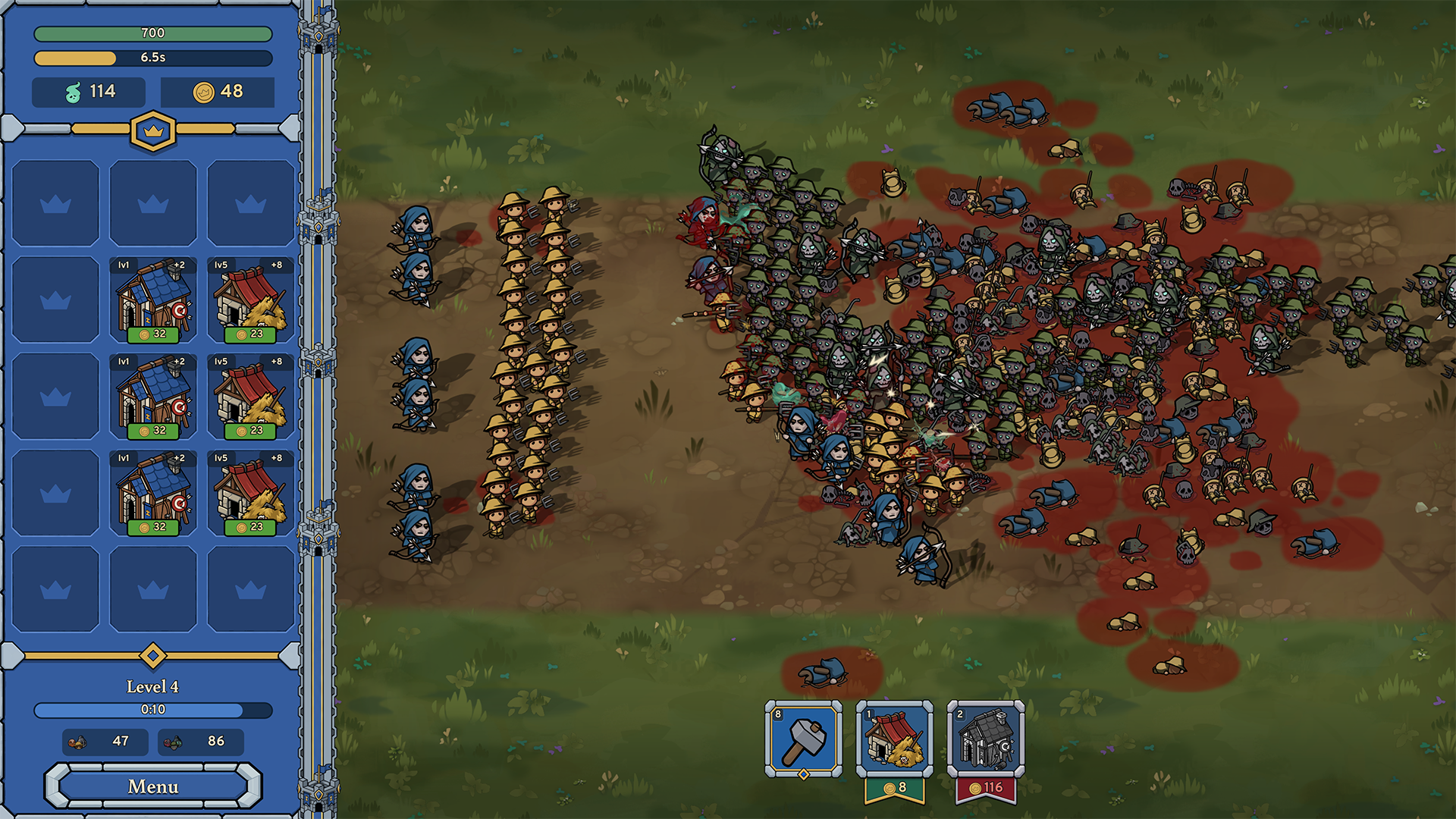
Here Comes the Horde connects the building grid to the battlefield. Buying production is how you increase the force protecting your wall. A building is therefore more than a filled square: it represents the next group of soldiers entering the fight.
Watch a production cycle after a purchase. Follow the new troops until they meet the enemy. If they arrive where your defense is already strong while another approach is empty, adding more in the same place may leave the real problem untouched. Look at both the number of troops and where they are needed.
The supplied full-game footage illustrates the relationship with peasant huts and archery buildings: melee bodies occupy attackers while archers contribute damage from behind them. Use that as a way to think about roles, rather than assuming every later-game unlock is available in the demo.
Gold now, souls between battles
Here Comes the Horde uses gold for battlefield purchases and souls for improvements between battles. Gold answers an immediate question: what can help the army currently defending the castle? Souls answer a longer-term question: what should be stronger when the next battle starts?
Before a gold purchase, identify a specific shortage. If too few soldiers reach the front, examine production. If troops reach it but disappear immediately, consider whether you need a stronger front line or more damage behind it. Spend to address the shortage, then watch the result before making another change.
Between attempts, match a soul purchase to the failure you just saw. Compare available unit, army, and wall improvements rather than spreading resources across unrelated options. An upgrade is most useful when you can explain which problem it is intended to solve.
Find a rhythm across the first seven levels
The seven-level demo gives you a short stretch in which to learn the loop: build, observe the clash, improve, and try the next defense. Treat each new battle as a check of your current army rather than automatically repeating the same spending pattern.
For your first attempt, focus on connecting a building purchase to the soldiers it creates. Once that is clear, watch how quickly your line forms and whether it holds across the whole wall. Before progressing, identify the purchase that made the largest visible difference. Carry that observation forward and reassess when the enemy pressure changes.
The how-to-play guide helps turn those observations into a sequence of decisions. It is useful to keep a short note after a loss: level, first weak point, and the one change you want to try.
When the defense fails, check the wall first
Here Comes the Horde can fill the middle of the battlefield with soldiers while an edge remains exposed. When your wall takes damage, look at the first approach that reached it, not just the largest fight on screen.
Start with three checks: did the army form too slowly, did the center absorb all your reinforcements, or was one side left without support? Change the part of the formation that addresses the earliest failure. Keeping the working parts makes the next attempt easier to compare.
02 / FIELD NOTES
A little preparation goes a long way.
How to play
Buildings, gold, souls, and the difference between fighting automatically and planning automatically.
Read the guide ↗02Mobile & browser help
Small screens, fullscreen, loading problems, and what this demo can—and cannot—promise.
Check your setup ↗03 / QUESTIONS AT THE GATE
Before you charge in.
Is Here Comes the Horde free to play?
The official browser demo is free to start in the player above. It uses itch.io's Game Embed for the build uploaded by Polished Games. The full Steam game is separate and paid; this website does not sell it.
Where can I play Here Comes the Horde?
Play the official browser demo in the player above or on Polished Games' itch.io page, or get the full game on Steam. Steam also offers a separate demo under app 5322720.
How much of the game is in this demo?
The developer describes the web demo as the first seven levels. Treat it as an introduction to the army-building and upgrade loop. Features, levels, and late-game strategies shown in full-game videos may not be available in this build.
Do I need to install anything or create an account?
No. Press Play above to load the official HTML5 demo in place; there is no installer and no account on this site. The game assets download in the browser, so the first launch may take time.
Can I play on my phone?
Reliable touch play is unverified; see our mobile compatibility page. Mobile compatibility
Is there a Steam demo as well as the browser demo?
Yes. The developer's Steam page has a separate demo listing (app 5322720) alongside the full game (app 5066010). We have not compared the two builds frame by frame, so do not assume the browser demo and the Steam demo contain exactly the same version.
Will my progress carry over to Steam?
We have not verified save transfer between the itch.io demo and Steam. This site does not provide cloud saves or a transfer service. Browser storage restrictions and clearing site data can affect a web game's stored data, so do not assume a run is backed up.
What are the system requirements?
The HTML5 demo loads in a browser without an installer; we recommend a current desktop browser but have not tested every device. Steam lists Windows 10 or newer, a 64-bit processor and OS, 8 GB RAM, and 1 GB storage for the full game; see Steam for the complete hardware requirements.
What should I do if the screen is blank?
Wait for the initial assets to download, then refresh if the player remains blank. Fullscreen gives a visible player more room but does not fix a failed download. Use the official itch.io link below the player if the embed still fails.
Is this the official game website?
No. HereComesTheHorde is an independent player site that embeds the developer-hosted demo using itch.io's official Game Embed. Polished Games owns the game. Official source links are provided for the demo and for the full release.